SDR vs HDR
The Display list at the bottom right of the Color panel switches between the SDR and HDR modes your system offers. Modes the current display can’t show are greyed out.
For the most part, you will want SDR — sRGB on both macOS and Windows, HDR10 PQ for HDR on Windows, and EDR — Linear P3 for HDR on macOS.
The presets list reacts to the mode you are in: presets that don’t suit it are dimmed, and each preset is tagged SDR or HDR.
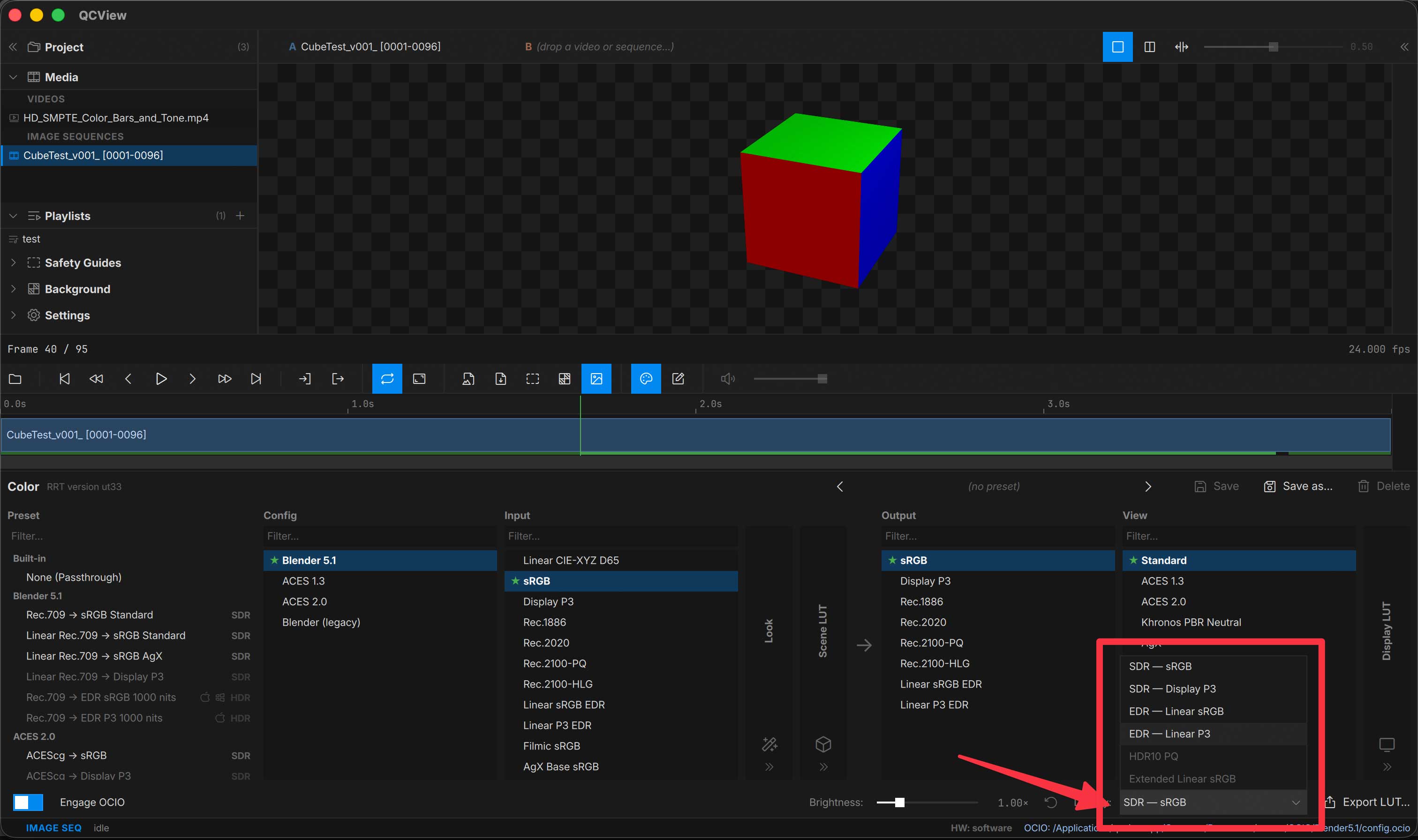
Color output with OCIO
SDR mode
In SDR mode, use an sRGB or a Rec.1886 output for a standard display-referred result.
To check an HDR master on an SDR display, turn on the clip’s Highlight Knee: it compresses the highlights above your chosen source peak into the display’s range instead of clipping them, and shows an amber KNEE pill while it does.
HDR mode (Windows)
With Windows HDR10 PQ mode enabled, use Rec.2100-PQ or a similarly named PQ output.
HDR mode (macOS — EDR)
In EDR — Linear P3 mode, use the matching Linear P3 EDR output in the ACES 2.0 or Blender 5.2 configs (Linear sRGB EDR for EDR — Linear sRGB).
With minColor
The minColor engine’s built-in presets come in three flavours per input: → sRGB for SDR, → EDR P3 (macOS) for EDR — Linear P3, and → Rec.2100 PQ (Windows) for HDR10 PQ. The Display reel holds the same encodings for chains you build yourself.
HDR sources
Pick the source’s colorspace as the clip’s Input: Rec.2100-PQ for a BT.2020 PQ master, ST2084-P3-D65 for a PQ master graded in P3-D65 (Resolve’s “P3-D65 ST2084”), Rec.2100-HLG for HLG. The Input stays with that clip, so SDR and HDR clips can sit side by side in the same project or dual view.
The Inspector’s HDR metadata row shows the file’s MaxCLL, MaxFALL and mastering peak when the container carries them.
HDR sources without tags
Some HDR exports carry no transfer tag, and a live source never carries a file’s tags: an SRT stream brings what its encoder put in the bitstream, and a QCBridge Transmit feed is the host’s working space, untagged by nature. QCView treats an untagged source as SDR, so the scopes would measure it in percent.
- Files, stills and sequences — set the Transfer pill in the Inspector (Color card for video, Image Sequence card for sequences and stills):
PQ 2020,PQ P3,HLG, orLinearfor a scene-linear feed. Auto tells you what the tags resolve to before you override them. - Streams — the same choice is a chip on the live strip, next to the Color panel button.
HDR out of an output
An output that carries a transfer (the AJA sink’s SDI and HDMI) has its own Transfer setting in the Output section: SDR Rec.709, PQ Rec.2100 or HLG Rec.2100. It is what the wire is told and signals, with the mastering metadata for PQ; the picture itself goes out as the viewport shows it. So for an HDR monitor on the card, pick the matching Rec.2100 display in the colour panel (OCIO or minColor) and set the output’s transfer to the same thing, or pass a Premiere or After Effects PQ feed straight through with the viewport on a PQ display.
- With OCIO on, the clip’s Input still decides how the picture and the scopes read the source; the Transfer pill then feeds the scope’s mismatch note when the two disagree.
Measuring in nits
The waveform’s nits scale is linear luminance: PQ and HLG sources plot their absolute values, and an SDR or scene-linear source puts its white at 100 nits, what a reference SDR monitor shows. The amber 203 line marks HDR graphics white (BT.2408) for placing titles and SDR inserts in an HDR programme. The Auto · % · nits chips under the waveform force either scale; see Scopes.